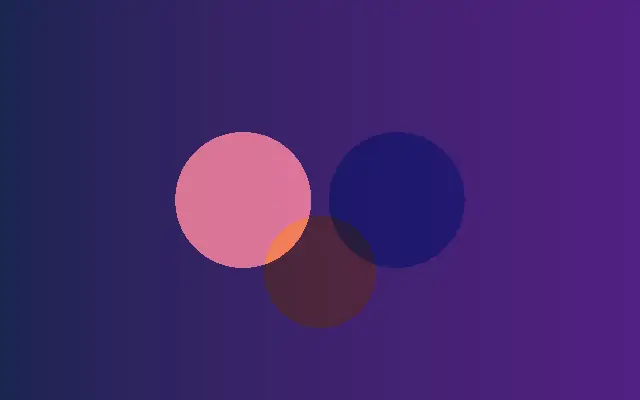
컨트롤 값이 반영된 코드입니다
// WebGPU 를 지원하는 브라우저에서만 그립니다.
import { Shader, Circle, LinearGradient } from 'shaders/react'

export default function ShaderEffect() {
  return (
    <Shader style={{ width: '100%', height: 320 }} disableTelemetry>
      <LinearGradient
        colorA="#172554"
        colorB="#581c87" />
      <Circle
        blendMode="screen"
        center={{
          x: 0.38,
          y: 0.5
        }}
        color="#fb7185"
        opacity={0.85}
        radius={0.34} />
      <Circle
        blendMode="multiply"
        center={{
          x: 0.62,
          y: 0.5
        }}
        color="#38bdf8"
        opacity={0.85}
        radius={0.34} />
      <Circle
        blendMode="overlay"
        center={{
          x: 0.5,
          y: 0.68
        }}
        color="#facc15"
        opacity={0.8}
        radius={0.28} />
    </Shader>
  )
}
<!-- WebGPU 를 지원하는 브라우저에서만 그립니다. -->
<script setup lang="ts">
import { Shader, Circle, LinearGradient } from 'shaders/vue'
</script>

<template>
  <Shader style="width: 100%; height: 320px" :disable-telemetry="true">
    <LinearGradient
      color-a="#172554"
      color-b="#581c87"/>
    <Circle
      blend-mode="screen"
      :center="{
        x: 0.38,
        y: 0.5
      }"
      color="#fb7185"
      :opacity="0.85"
      :radius="0.34"/>
    <Circle
      blend-mode="multiply"
      :center="{
        x: 0.62,
        y: 0.5
      }"
      color="#38bdf8"
      :opacity="0.85"
      :radius="0.34"/>
    <Circle
      blend-mode="overlay"
      :center="{
        x: 0.5,
        y: 0.68
      }"
      color="#facc15"
      :opacity="0.8"
      :radius="0.28"/>
  </Shader>
</template>
<!-- WebGPU 를 지원하는 브라우저에서만 그립니다. -->
<script>
  import { Shader, Circle, LinearGradient } from 'shaders/svelte'
</script>

<Shader style="width: 100%; height: 320px" disableTelemetry>
  <LinearGradient
    colorA="#172554"
    colorB="#581c87" />
  <Circle
    blendMode="screen"
    center={{
      x: 0.38,
      y: 0.5
    }}
    color="#fb7185"
    opacity={0.85}
    radius={0.34} />
  <Circle
    blendMode="multiply"
    center={{
      x: 0.62,
      y: 0.5
    }}
    color="#38bdf8"
    opacity={0.85}
    radius={0.34} />
  <Circle
    blendMode="overlay"
    center={{
      x: 0.5,
      y: 0.68
    }}
    color="#facc15"
    opacity={0.8}
    radius={0.28} />
</Shader>
// WebGPU 를 지원하는 브라우저에서만 그립니다.
import { Shader, Circle, LinearGradient } from 'shaders/solid'

export default function ShaderEffect() {
  return (
    <Shader style={{ width: '100%', height: '320px' }} disableTelemetry>
      <LinearGradient
        colorA="#172554"
        colorB="#581c87" />
      <Circle
        blendMode="screen"
        center={{
          x: 0.38,
          y: 0.5
        }}
        color="#fb7185"
        opacity={0.85}
        radius={0.34} />
      <Circle
        blendMode="multiply"
        center={{
          x: 0.62,
          y: 0.5
        }}
        color="#38bdf8"
        opacity={0.85}
        radius={0.34} />
      <Circle
        blendMode="overlay"
        center={{
          x: 0.5,
          y: 0.68
        }}
        color="#facc15"
        opacity={0.8}
        radius={0.28} />
    </Shader>
  )
}
// WebGPU 를 지원하는 브라우저에서만 그립니다.
// <canvas id="canvas" style="width:100%;height:320px"></canvas> 가 페이지에 있어야 한다
import { createShader } from 'shaders/js'

const shader = await createShader(document.getElementById("canvas"), {
  components: [
    {
      type: 'LinearGradient',
      props: {
        colorA: '#172554',
        colorB: '#581c87',
      },
    },
    {
      type: 'Circle',
      props: {
        blendMode: 'screen',
        center: {
          x: 0.38,
          y: 0.5
        },
        color: '#fb7185',
        opacity: 0.85,
        radius: 0.34,
      },
    },
    {
      type: 'Circle',
      props: {
        blendMode: 'multiply',
        center: {
          x: 0.62,
          y: 0.5
        },
        color: '#38bdf8',
        opacity: 0.85,
        radius: 0.34,
      },
    },
    {
      type: 'Circle',
      props: {
        blendMode: 'overlay',
        center: {
          x: 0.5,
          y: 0.68
        },
        color: '#facc15',
        opacity: 0.8,
        radius: 0.28,
      },
    }
  ]
}, { disableTelemetry: true })