Conic Gradient

원뿔형 그라디언트

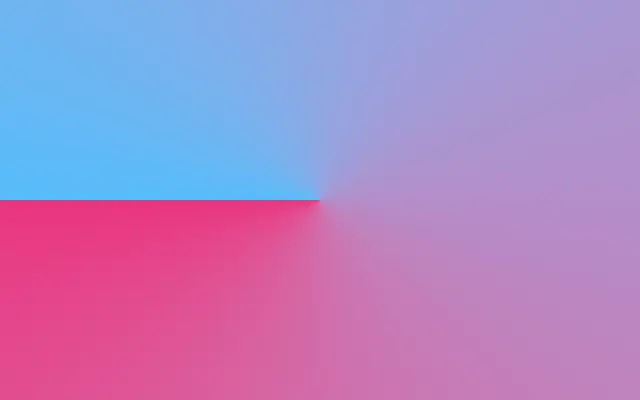
Colors sweep in a full circle around a center point, like a color wheel.

Also known as: ConicGradientAngular gradient

Moves in browsers that support WebGPU

This device could not render the demo — showing a still

React
// Renders only in browsers with WebGPU.
import { Shader, ConicGradient } from 'shaders/react'

export default function ShaderEffect() {
  return (
    <Shader style={{ width: '100%', height: 320 }} disableTelemetry>
      <ConicGradient />
    </Shader>
  )
}
Vue
<!-- Renders only in browsers with WebGPU. -->
<script setup lang="ts">
import { Shader, ConicGradient } from 'shaders/vue'
</script>

<template>
  <Shader style="width: 100%; height: 320px" :disable-telemetry="true">
    <ConicGradient/>
  </Shader>
</template>
Svelte
<!-- Renders only in browsers with WebGPU. -->
<script>
  import { Shader, ConicGradient } from 'shaders/svelte'
</script>

<Shader style="width: 100%; height: 320px" disableTelemetry>
  <ConicGradient />
</Shader>
Solid
// Renders only in browsers with WebGPU.
import { Shader, ConicGradient } from 'shaders/solid'

export default function ShaderEffect() {
  return (
    <Shader style={{ width: '100%', height: '320px' }} disableTelemetry>
      <ConicGradient />
    </Shader>
  )
}
JavaScript
// Renders only in browsers with WebGPU.
// expects <canvas id="canvas" style="width:100%;height:320px"></canvas> on the page
import { createShader } from 'shaders/js'

const shader = await createShader(document.getElementById("canvas"), {
  components: [
    {
      type: 'ConicGradient',
    }
  ]
}, { disableTelemetry: true })

Props · ConicGradient

Changes apply to the demo above and to the code tabs. Descriptions come from the library registry (MIT).

NameValueDefaultRange / optionsDescription
colorAColor A#FF0080—Starting color of the sweep
colorBColor B#00BFFF—Ending color of the sweep (wraps back to Color A)
stopsColorsSet in codenull—Multi-stop gradient colors (overrides Color A / Color B when set)
centerCenter
x0.5y0.5
{"x":0.5,"y":0.5}x, y: 0 – 1Center point of the sweep
rotationRotation00 – 360 (step 1)Rotation offset in degrees — shifts where Color A begins
repeatRepeat11 – 24 (step 1)Number of times the gradient repeats around the circle. Values above 1 create a starburst pattern.
colorSpaceColor Spacelinearlinear · oklch · oklab · hsl · hsv · lchColor space for color interpolation

Every component also takes blendMode · opacity · visible · maskSource/maskType · boundingBox · id

Imagine painting a disk while turning it: the color changes with the angle and completes a full circle. This suits color wheels and circular progress visuals where angle matters.

The sweep starts at `colorA` and wraps to `colorB`; setting `stops` creates a cycle with several colors. Change `rotation` to move the starting color around the center (default 0°, range 0–360°). A `repeat` above 1 repeats the color cycle around the circle, creating a starburst-like pattern (default 1, range 1–24).

This generator fills the canvas and needs no input layer. Color boundaries radiate from the center, so check whether they intersect any text placed above it. High repetition makes the result strongly decorative and may overwhelm a simple status indicator.

When to use

Use it for color wheels, circular progress states, angle-based segments, or radial decoration. Avoid it when the background needs a broad, quiet area for reading.

Open as page ↗