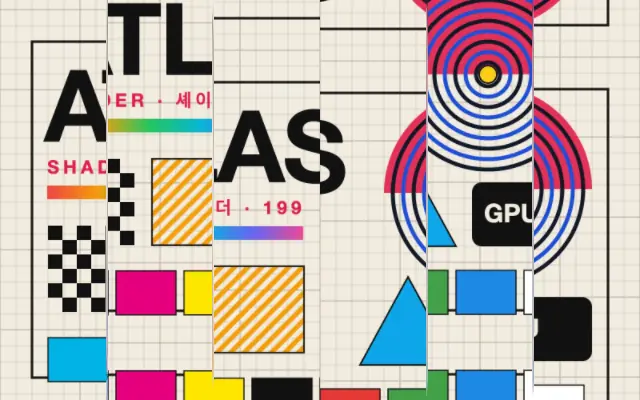
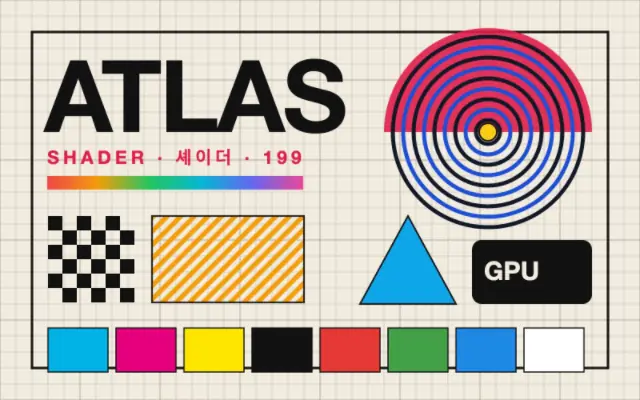
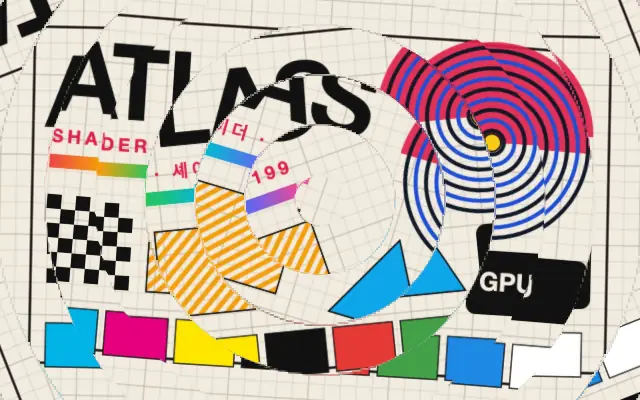
Parallel strips offset by different amounts create a fractured or glitch-like image.
Also known as: BarShiftGlitch barsSlice shift
Moves in browsers that support WebGPU
This device could not render the demo — showing a still
Code reflects the control values
React
// Renders only in browsers with WebGPU.
// /samples/… are this site’s sample files — point them at your own image or video.
import { Shader, BarShift, ImageTexture } from 'shaders/react'

export default function ShaderEffect() {
  return (
    <Shader style={{ width: '100%', height: 320 }} disableTelemetry>
      <ImageTexture
        objectFit="cover"
        url="/samples/poster.jpg" />
      <BarShift
        speed={0.4} />
    </Shader>
  )
}
Vue
<!-- Renders only in browsers with WebGPU. -->
<!-- /samples/… are this site’s sample files — point them at your own image or video. -->
<script setup lang="ts">
import { Shader, BarShift, ImageTexture } from 'shaders/vue'
</script>

<template>
  <Shader style="width: 100%; height: 320px" :disable-telemetry="true">
    <ImageTexture
      object-fit="cover"
      url="/samples/poster.jpg"/>
    <BarShift
      :speed="0.4"/>
  </Shader>
</template>
Svelte
<!-- Renders only in browsers with WebGPU. -->
<!-- /samples/… are this site’s sample files — point them at your own image or video. -->
<script>
  import { Shader, BarShift, ImageTexture } from 'shaders/svelte'
</script>

<Shader style="width: 100%; height: 320px" disableTelemetry>
  <ImageTexture
    objectFit="cover"
    url="/samples/poster.jpg" />
  <BarShift
    speed={0.4} />
</Shader>
Solid
// Renders only in browsers with WebGPU.
// /samples/… are this site’s sample files — point them at your own image or video.
import { Shader, BarShift, ImageTexture } from 'shaders/solid'

export default function ShaderEffect() {
  return (
    <Shader style={{ width: '100%', height: '320px' }} disableTelemetry>
      <ImageTexture
        objectFit="cover"
        url="/samples/poster.jpg" />
      <BarShift
        speed={0.4} />
    </Shader>
  )
}
JavaScript
// Renders only in browsers with WebGPU.
// /samples/… are this site’s sample files — point them at your own image or video.
// expects <canvas id="canvas" style="width:100%;height:320px"></canvas> on the page
import { createShader } from 'shaders/js'

const shader = await createShader(document.getElementById("canvas"), {
  components: [
    {
      type: 'ImageTexture',
      props: {
        objectFit: 'cover',
        url: '/samples/poster.jpg',
      },
    },
    {
      type: 'BarShift',
      props: {
        speed: 0.4,
      },
    }
  ]
}, { disableTelemetry: true })
Props · BarShift
Changes apply to the demo above and to the code tabs. Descriptions come from the library registry (MIT).
Name
Value
Default
Range / options
Description
countCount
6
1 – 30 (step 1)
Number of bars across the longest viewport dimension
angleAngle
0
-180 – 180 (step 1)
Angle of bar orientation in degrees (0 = vertical bars, 90 = horizontal bars)
intensityIntensity
0.15
0 – 1 (step 0.01)
Maximum displacement per bar
seedSeed
0
0 – 100 (step 1)
Randomization seed for per-bar offset variation
speedSpeed
0
-2 – 2 (step 0.1)
Animation speed — each bar drifts at its own rate and direction
edgesEdges
mirror
stretch · transparent · mirror · wrap
How to handle edges when distortion pushes content out of bounds
Every component also takes blendMode · opacity · visible · maskSource/maskType · boundingBox · id
Like a video signal slipping out of alignment, the frame breaks into strips that shift independently.
Increase `count` to add strips and change `angle` to turn their direction. `intensity` sets the maximum offset, `speed` controls motion, and changing `seed` varies the offsets assigned to each strip.
Place it above an image layer. Pair it with `DataMosh` or `Glitch` for a stronger signal-error look, and check `edges`. Avoid it when small copy or tables must remain intact.
When to use
Use it for brief glitch transitions, music-video backgrounds, and broken-screen visuals. Avoid it on primary screens that need to communicate precise information or copy.