Falling Lines

낙하 광선

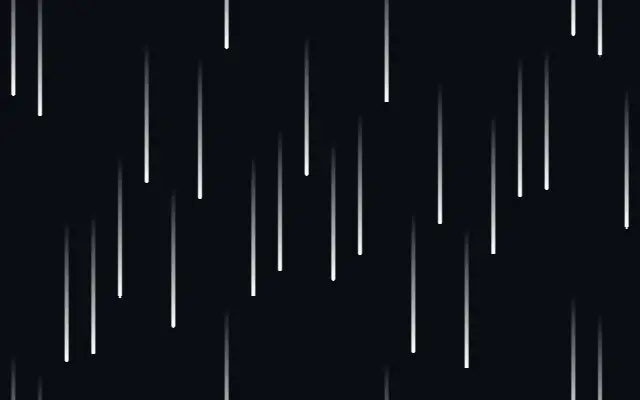
Directional falling lines with a leading-to-trailing color fade.

Also known as: FallingLinesFalling linesLight streaks

Moves in browsers that support WebGPU

This device could not render the demo — showing a still

React
// Renders only in browsers with WebGPU.
import { Shader, FallingLines } from 'shaders/react'

export default function ShaderEffect() {
  return (
    <Shader style={{ width: '100%', height: 320 }} disableTelemetry>
      <FallingLines />
    </Shader>
  )
}
Vue
<!-- Renders only in browsers with WebGPU. -->
<script setup lang="ts">
import { Shader, FallingLines } from 'shaders/vue'
</script>

<template>
  <Shader style="width: 100%; height: 320px" :disable-telemetry="true">
    <FallingLines/>
  </Shader>
</template>
Svelte
<!-- Renders only in browsers with WebGPU. -->
<script>
  import { Shader, FallingLines } from 'shaders/svelte'
</script>

<Shader style="width: 100%; height: 320px" disableTelemetry>
  <FallingLines />
</Shader>
Solid
// Renders only in browsers with WebGPU.
import { Shader, FallingLines } from 'shaders/solid'

export default function ShaderEffect() {
  return (
    <Shader style={{ width: '100%', height: '320px' }} disableTelemetry>
      <FallingLines />
    </Shader>
  )
}
JavaScript
// Renders only in browsers with WebGPU.
// expects <canvas id="canvas" style="width:100%;height:320px"></canvas> on the page
import { createShader } from 'shaders/js'

const shader = await createShader(document.getElementById("canvas"), {
  components: [
    {
      type: 'FallingLines',
    }
  ]
}, { disableTelemetry: true })

Props · FallingLines

Changes apply to the demo above and to the code tabs. Descriptions come from the library registry (MIT).

NameValueDefaultRange / optionsDescription
colorALead Color#ffffff—Color at the leading edge of each line
colorBTrail Color#ffffff00—Color at the trailing edge (transparent by default)
colorSpaceColor Spacelinearlinear · oklch · oklab · hsl · hsv · lchColor space for interpolation between lead and trail colors
angleAngle900 – 360 (step 1)Direction of movement in degrees (90=down, 270=up, 0=right, 180=left)
speedSpeed0.50 – 3 (step 0.01)Movement speed
speedVarianceSpeed Variance0.30 – 1 (step 0.01)Per-line speed variance (0=uniform, 1=high variance)
densityDensity151 – 60 (step 1)Number of line columns across the canvas
trailLengthTrail Length0.350.01 – 1 (step 0.01)Streak length relative to spacing (0=point, 1=continuous)
balanceBalance0.50 – 1 (step 0.01)Color mix midpoint (0.5=linear, 0=all trailing/colorB, 1=all leading/colorA)
strokeWidthStroke Width0.150.02 – 1 (step 0.02)Line thickness as fraction of column width (0=hairline, 1=full width)
roundingRounding10 – 1 (step 0.01)Rounds the leading edge (0=flat/square, 1=fully rounded cap)

Every component also takes blendMode · opacity · visible · maskSource/maskType · boundingBox · id

It resembles rain or a data stream: short lines move in one direction, fading from a clear leading edge to a trailing edge.

`angle` from 0–360 sets direction: 90 moves down, 270 up, 0 right, and 180 left. `speed` from 0–3 changes movement pace, `density` from 1–60 sets the number of line columns, and `trailLength` from 0.01–1 controls streak length. `balance` from 0–1 shifts the transition between leading and trailing colors.

Falling Lines draws its own background layer. A simple direction over a dark surface keeps the motion readable. Dense lines can compete with text, so reduce density and trail length together.

When to use

Use it for rain or data-stream inspired backgrounds, a short directional transition, or a hero that needs a sense of speed. Avoid layering it over important text or precise charts.

Open as page ↗