Checkerboard

체커보드

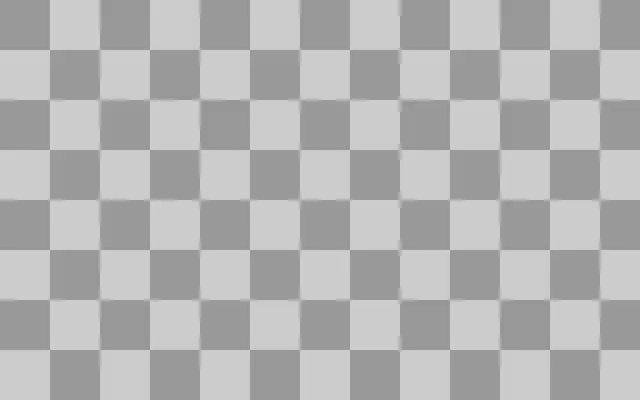
A board of square tiles that alternate between two colors.

Also known as: Checkerboard바둑판 무늬

Moves in browsers that support WebGPU

This device could not render the demo — showing a still

React
// Renders only in browsers with WebGPU.
import { Shader, Checkerboard } from 'shaders/react'

export default function ShaderEffect() {
  return (
    <Shader style={{ width: '100%', height: 320 }} disableTelemetry>
      <Checkerboard />
    </Shader>
  )
}
Vue
<!-- Renders only in browsers with WebGPU. -->
<script setup lang="ts">
import { Shader, Checkerboard } from 'shaders/vue'
</script>

<template>
  <Shader style="width: 100%; height: 320px" :disable-telemetry="true">
    <Checkerboard/>
  </Shader>
</template>
Svelte
<!-- Renders only in browsers with WebGPU. -->
<script>
  import { Shader, Checkerboard } from 'shaders/svelte'
</script>

<Shader style="width: 100%; height: 320px" disableTelemetry>
  <Checkerboard />
</Shader>
Solid
// Renders only in browsers with WebGPU.
import { Shader, Checkerboard } from 'shaders/solid'

export default function ShaderEffect() {
  return (
    <Shader style={{ width: '100%', height: '320px' }} disableTelemetry>
      <Checkerboard />
    </Shader>
  )
}
JavaScript
// Renders only in browsers with WebGPU.
// expects <canvas id="canvas" style="width:100%;height:320px"></canvas> on the page
import { createShader } from 'shaders/js'

const shader = await createShader(document.getElementById("canvas"), {
  components: [
    {
      type: 'Checkerboard',
    }
  ]
}, { disableTelemetry: true })

Props · Checkerboard

Changes apply to the demo above and to the code tabs. Descriptions come from the library registry (MIT).

NameValueDefaultRange / optionsDescription
colorAColor A#cccccc—First color of the checkerboard pattern
colorBColor B#999999—Second color of the checkerboard pattern
cellsCells81 – 50 (step 1)Number of cells along the canvas height (creates square cells). Switch the unit to px in the editor to set an absolute cell size instead.
softnessSoftness00 – 1 (step 0.1)Smoothness of the transition between colors (0 = hard edges, 1 = very soft)
colorSpaceColor Spacelinearlinear · oklch · oklab · hsl · hsv · lchColor space for color interpolation

Every component also takes blendMode · opacity · visible · maskSource/maskType · boundingBox · id

It looks like a chessboard or an old tiled floor, with two square colors taking turns. The regular cells create a clear rhythm without extra detail.

Increase `cells` to fit more, smaller squares along the canvas height; choose the alternating colors with `colorA` and `colorB`. `softness` softens the color boundary. `colorSpace` selects how colors are interpolated when that boundary is soft.

This pattern fills the canvas by itself, so it needs no input layer. Strongly contrasting squares can compete with text; use it as a background or keep the two colors closer together.

When to use

Use it for board-game-inspired backgrounds, tiled graphics, or a loading screen that needs a repeating motif. Avoid placing high-contrast squares behind small text, where they can feel visually busy.

Open as page ↗