

프리즘 광선

Prism

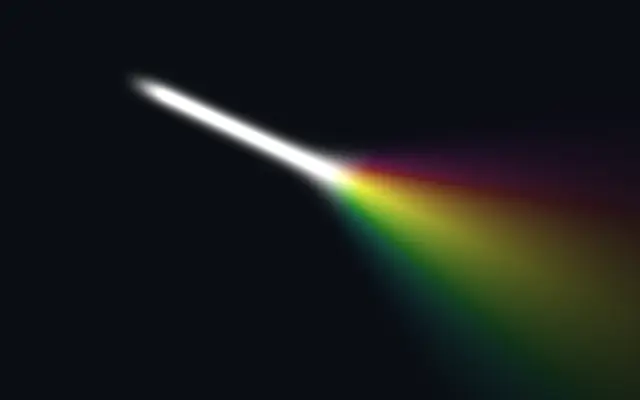
한 줄기 빛이 지정한 지점 뒤에서 부채꼴로 퍼져 천천히 움직이는 무지개로 나뉩니다.

다른 이름: PrismPrismatic lightRainbow beam

WebGPU 를 지원하는 브라우저에서 움직입니다

이 기기에서는 데모를 그리지 못해 정지 화면을 보여 줍니다

React
// WebGPU 를 지원하는 브라우저에서만 그립니다.
import { Shader, Prism } from 'shaders/react'

export default function ShaderEffect() {
  return (
    <Shader style={{ width: '100%', height: 320 }} disableTelemetry>
      <Prism />
    </Shader>
  )
}
Vue
<!-- WebGPU 를 지원하는 브라우저에서만 그립니다. -->
<script setup lang="ts">
import { Shader, Prism } from 'shaders/vue'
</script>

<template>
  <Shader style="width: 100%; height: 320px" :disable-telemetry="true">
    <Prism/>
  </Shader>
</template>
Svelte
<!-- WebGPU 를 지원하는 브라우저에서만 그립니다. -->
<script>
  import { Shader, Prism } from 'shaders/svelte'
</script>

<Shader style="width: 100%; height: 320px" disableTelemetry>
  <Prism />
</Shader>
Solid
// WebGPU 를 지원하는 브라우저에서만 그립니다.
import { Shader, Prism } from 'shaders/solid'

export default function ShaderEffect() {
  return (
    <Shader style={{ width: '100%', height: '320px' }} disableTelemetry>
      <Prism />
    </Shader>
  )
}
JavaScript
// WebGPU 를 지원하는 브라우저에서만 그립니다.
// <canvas id="canvas" style="width:100%;height:320px"></canvas> 가 페이지에 있어야 한다
import { createShader } from 'shaders/js'

const shader = await createShader(document.getElementById("canvas"), {
  components: [
    {
      type: 'Prism',
    }
  ]
}, { disableTelemetry: true })

속성(props) · Prism

값을 바꾸면 위 데모와 코드 탭에 바로 반영됩니다. 설명은 라이브러리 레지스트리의 영어 원문(MIT)입니다.

이름값기본값범위·선택지설명(원문)
positionSource
x0.18y0.18
{"x":0.18,"y":0.18}x, y: 0 – 1Where the beam originates
beamWidthBeam Width0.040.002 – 0.3 (step 0.002)Thickness of the white beam
intensityIntensity1.60 – 4 (step 0.01)Brightness (above 1 blows the core to white)
beamColorBeam Color#ffffff—color of the beam before it splits
startFalloffStart Falloff0.150 – 1 (step 0.01)How softly the beam fades in at its source
endFalloffEnd Falloff0.60.02 – 2 (step 0.01)How quickly the rainbow fades out with distance
splitPositionSplit Point
x0.5y0.42
{"x":0.5,"y":0.42}x, y: 0 – 1Where the beam starts to fan out and split (projected onto the beam axis)
spreadSpread0.70 – 3 (step 0.01)How widely the rainbow diffuses as it travels past the split point
softnessSoftness0.120.001 – 1 (step 0.005)How quickly the white beam transitions into the rainbow
saturationSaturation0.950 – 1 (step 0.01)Rainbow saturation — 0 = white, 1 = full color
speedHue Speed0.1-1 – 1 (step 0.01)Speed the hue slowly rotates through the rainbow (0 = static)

모든 컴포넌트 공통: blendMode · opacity · visible · maskSource/maskType · boundingBox · id

유리 프리즘을 통과한 빛처럼 흰 광선이 한 지점을 지나며 넓어지고, 뒤쪽으로 무지개 색이 퍼집니다.

`position`은 광선의 시작점, `splitPosition`은 색이 갈라지기 시작하는 지점입니다. `beamWidth`는 흰 광선의 굵기(0.002~0.3), `spread`는 무지개가 퍼지는 폭(0~3), `saturation`은 색의 선명도(0~1)를 조절합니다.

배경이 투명한 생성 레이어이므로 어두운 배경 위에 합성해야 잘 보입니다. 화면 전체를 덮기보다 작은 영역에 두고, 밝은 글자나 로고를 가리지 않도록 `spread`와 채도를 조절하세요.

언제 쓰나

어두운 히어로의 무지개 포인트, 음악·공연 포스터, 한 지점에서 색이 확산되는 전환 장면에 적합합니다. 색상 규칙이 엄격하거나 차분한 정보 화면에서는 피하세요.

페이지로 열기 ↗