구이 액체

Goo

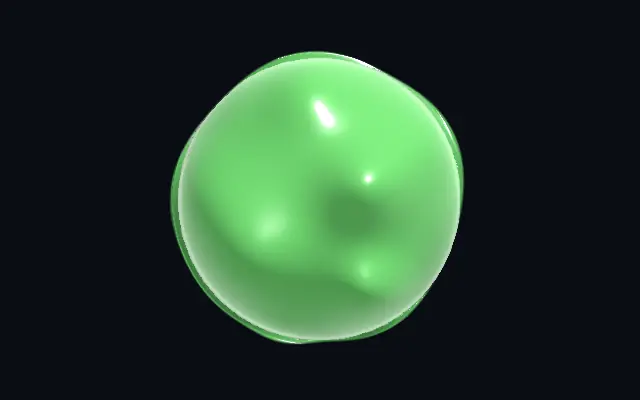
도형 안에서 서로 합쳐지고 움직이는 젖은 액체 방울과 반짝이는 하이라이트를 만듭니다.

다른 이름: GooMetaball liquidLiquid blobs

WebGPU 를 지원하는 브라우저에서 움직입니다

이 기기에서는 데모를 그리지 못해 정지 화면을 보여 줍니다

React
// WebGPU 를 지원하는 브라우저에서만 그립니다.
import { Shader, Goo } from 'shaders/react'

export default function ShaderEffect() {
  return (
    <Shader style={{ width: '100%', height: 320 }} disableTelemetry>
      <Goo />
    </Shader>
  )
}
Vue
<!-- WebGPU 를 지원하는 브라우저에서만 그립니다. -->
<script setup lang="ts">
import { Shader, Goo } from 'shaders/vue'
</script>

<template>
  <Shader style="width: 100%; height: 320px" :disable-telemetry="true">
    <Goo/>
  </Shader>
</template>
Svelte
<!-- WebGPU 를 지원하는 브라우저에서만 그립니다. -->
<script>
  import { Shader, Goo } from 'shaders/svelte'
</script>

<Shader style="width: 100%; height: 320px" disableTelemetry>
  <Goo />
</Shader>
Solid
// WebGPU 를 지원하는 브라우저에서만 그립니다.
import { Shader, Goo } from 'shaders/solid'

export default function ShaderEffect() {
  return (
    <Shader style={{ width: '100%', height: '320px' }} disableTelemetry>
      <Goo />
    </Shader>
  )
}
JavaScript
// WebGPU 를 지원하는 브라우저에서만 그립니다.
// <canvas id="canvas" style="width:100%;height:320px"></canvas> 가 페이지에 있어야 한다
import { createShader } from 'shaders/js'

const shader = await createShader(document.getElementById("canvas"), {
  components: [
    {
      type: 'Goo',
    }
  ]
}, { disableTelemetry: true })

속성(props) · Goo

값을 바꾸면 위 데모와 코드 탭에 바로 반영됩니다. 설명은 라이브러리 레지스트리의 영어 원문(MIT)입니다.

이름값기본값범위·선택지설명(원문)
originOrigin코드에서 지정center—Reference edge the center position is measured from (center default). Lets you pin the shape relative to a corner or the canvas centre.
centerCenter
x0.5y0.5
{"x":0.5,"y":0.5}x, y: 0 – 1Center position of the goo
scaleScale10.1 – 3 (step 0.01)Scale of the goo (1 = default size)
rotationRotation00 – 360 (step 1)Rotation of the goo in degrees
gooColorGoo Color#37c95a—Base liquid color (a glossy slime green by default)
translucencyTranslucency0.60 – 1 (step 0.01)Subsurface glow strength — deep lobes transmit more color
absorbAbsorption20 – 6 (step 0.01)How fast thin areas clear and thick areas saturate (Beer–Lambert)
containmentContainment0.90 – 1 (step 0.01)0 = free blobs that ignore the shape, 1 = goo fills the shape and its surface conforms to the 3D form (highlights track the faces as it rotates)
edgeSoftnessEdge Softness0.060 – 0.3 (step 0.005)Softness of the blob coverage edge
blobScaleBlob Size0.30.1 – 1 (step 0.01)Base radius of each liquid lobe
spreadSpread10 – 2 (step 0.01)How far the lobes scatter across the shape
mergeMerge0.60 – 1 (step 0.01)How much the lobes fuse together — low = distinct beads, high = one fused mass
bulgeBulge10 – 1.5 (step 0.01)How 3D-rounded each lobe reads — dome height of the wet surface
thresholdThreshold0.50.2 – 0.9 (step 0.01)Iso-surface level — lower makes fatter, fuller blobs
lightAngleLight Angle3000 – 360 (step 1)Light direction in degrees
wetnessHighlights20 – 5 (step 0.01)Master scale on the sharp specular highlight and clearcoat rim
fresnelFresnel0.250 – 1 (step 0.01)Clearcoat fresnel rim strength wrapping each lobe
specColorHighlight Color#ffffff—Highlight / rim color (white reads as a clear wet coat)
ambientAmbient0.250 – 1 (step 0.01)Base fill so shadowed goo isn't black
speedSpeed0.50 – 2 (step 0.01)Drift and breathe speed of the blobs. 0 pauses.
wobbleWobble0.50 – 1 (step 0.01)Drift amplitude — how far the lobe centers wander
breatheBreathe0.30 – 1 (step 0.01)Radius pulsing amplitude — lobes swell and shrink
seedSeed10 – 100 (step 1)Variation offset — shifts the blob arrangement
shapeShape코드에서 지정{"type":"sphere3D","radius":0.35}—Serialized shape configuration (JSON)
shapeSdfUrlshapeSdfUrl코드에서 지정—URL to a pre-generated SDF .bin file
shapeTypeshapeType코드에서 지정—Active SDF shape type

모든 컴포넌트 공통: blendMode · opacity · visible · maskSource/maskType · boundingBox · id

물방울 몇 개가 서로 붙어 하나의 말랑한 덩어리가 되는 듯, 액체 방울이 합쳐지고 표면의 빛이 미끄러집니다.

`translucency`를 올리면 두꺼운 방울 안쪽의 빛이 강해집니다. `containment`는 방울이 도형 안에 머물며 표면을 따르는 정도를, `blobScale`은 각 방울의 크기를 조절합니다. `spread`를 높이면 방울이 더 넓게 퍼지고, `merge`는 여러 방울이 하나로 붙는 정도를 바꿉니다.

자체적으로 움직이는 덩어리를 만들기 때문에 장난스러운 배지나 배경 장식에 어울립니다. 표면이 계속 변하므로 정밀한 모서리나 작은 글자가 주인공인 화면에는 피하세요.

언제 쓰나

구이 스타일 버튼, 젤리 같은 아이콘, 움직이는 장식 배경에 잘 맞습니다. 정밀한 로고 윤곽이나 작고 또렷한 텍스트에는 피하세요.

페이지로 열기 ↗