
가장자리 빛 번짐

Irradiance

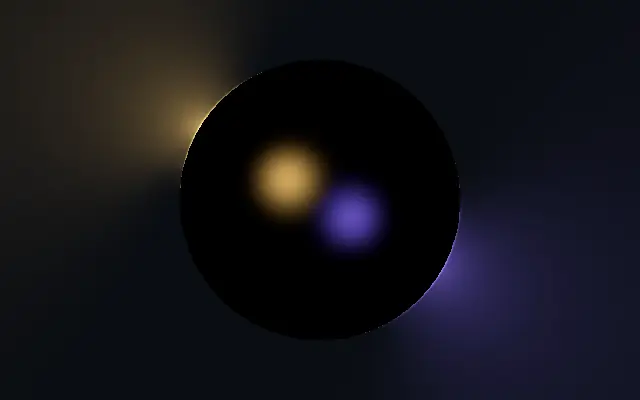
색이 있는 점광원이 도형 가장자리를 비추고 주변으로 빛이 번집니다.

다른 이름: IrradianceEdge illuminationLight spill

WebGPU 를 지원하는 브라우저에서 움직입니다

이 기기에서는 데모를 그리지 못해 정지 화면을 보여 줍니다

React
// WebGPU 를 지원하는 브라우저에서만 그립니다.
import { Shader, Irradiance } from 'shaders/react'

export default function ShaderEffect() {
  return (
    <Shader style={{ width: '100%', height: 320 }} disableTelemetry>
      <Irradiance />
    </Shader>
  )
}
Vue
<!-- WebGPU 를 지원하는 브라우저에서만 그립니다. -->
<script setup lang="ts">
import { Shader, Irradiance } from 'shaders/vue'
</script>

<template>
  <Shader style="width: 100%; height: 320px" :disable-telemetry="true">
    <Irradiance/>
  </Shader>
</template>
Svelte
<!-- WebGPU 를 지원하는 브라우저에서만 그립니다. -->
<script>
  import { Shader, Irradiance } from 'shaders/svelte'
</script>

<Shader style="width: 100%; height: 320px" disableTelemetry>
  <Irradiance />
</Shader>
Solid
// WebGPU 를 지원하는 브라우저에서만 그립니다.
import { Shader, Irradiance } from 'shaders/solid'

export default function ShaderEffect() {
  return (
    <Shader style={{ width: '100%', height: '320px' }} disableTelemetry>
      <Irradiance />
    </Shader>
  )
}
JavaScript
// WebGPU 를 지원하는 브라우저에서만 그립니다.
// <canvas id="canvas" style="width:100%;height:320px"></canvas> 가 페이지에 있어야 한다
import { createShader } from 'shaders/js'

const shader = await createShader(document.getElementById("canvas"), {
  components: [
    {
      type: 'Irradiance',
    }
  ]
}, { disableTelemetry: true })

속성(props) · Irradiance

값을 바꾸면 위 데모와 코드 탭에 바로 반영됩니다. 설명은 라이브러리 레지스트리의 영어 원문(MIT)입니다.

이름값기본값범위·선택지설명(원문)
originOrigin코드에서 지정center—Reference edge the center position is measured from (center default). Lets you pin the shape relative to a corner or the canvas centre.
centerCenter
x0.5y0.5
{"x":0.5,"y":0.5}x, y: 0 – 1Center position of the shape
scaleScale10.1 – 3 (step 0.01)Scale of the shape (1 = default size)
rotationRotation00 – 360 (step 1)Rotation of the shape in degrees
lightsLights코드에서 지정[{"position":{"x":0.3,"y":0.3},"color":"#ffb347","intensi…—The point lights striking the shape — each with its own position, color and brightness
lightHeightLight Height0.50.05 – 3 (step 0.01)Height of the lights above the shape plane, relative to the shape — low lights graze the body, high lights flood it evenly
lightRangeRange1.20.1 – 4 (step 0.01)Reach of each light — the distance at which it has fallen to half strength, relative to the shape
reachReach30.5 – 8 (step 0.01)How far from the shape the spilled light is gathered, relative to the shape — the glow fades out toward this distance
coreCore10 – 2 (step 0.01)The lit edge seen directly — the white-hot line along the rim where the lights strike
wrapWrap0.10 – 1 (step 0.01)How far light wraps around edges that face away from it — 0 leaves the far side dark
shadowsShadowstrue—Cast shadows — the body blocks each light from edges it stands in front of (keeps holes and concave pockets dark)
shadowSoftnessShadow Softness0.150 – 1 (step 0.01)Penumbra width of the cast shadows — 0 is razor sharp
bodyColorBody Color#000000—Color of the shape itself — black for a pure occluder, lighter to see the lights land on its form
bodyLightBody Light0.60 – 2 (step 0.01)How much the lights illuminate the body — the bevel of a flat shape or the form of a 3D one
bevelWidthBevel Width0.010.005 – 0.2 (step 0.001)Width of the rounded edge a flat shape catches the light on, relative to the shape
edgeSoftnessEdge Softness0.050 – 1 (step 0.01)Softness of the shape boundary edge
shapeShape코드에서 지정{"type":"sphere3D","radius":0.35}—Serialized shape configuration (JSON)
shapeSdfUrlshapeSdfUrl코드에서 지정—URL to a pre-generated SDF .bin file
shapeTypeshapeType코드에서 지정—Active SDF shape type

모든 컴포넌트 공통: blendMode · opacity · visible · maskSource/maskType · boundingBox · id

어두운 공간에서 여러 색 조명이 물체 윤곽을 비추는 듯, 가장자리에서 빛이 번지고 빛끼리 만나는 곳은 밝아집니다.

`lights`에서 점광원의 위치와 색, 밝기를 조절합니다. `reach`는 빛이 도형 밖으로 퍼지는 거리를, `core`는 가장자리의 직접 밝기를 바꿉니다. `wrap`을 올리면 광원을 등진 면에도 빛이 감돌고, `shadows`는 앞쪽 면이 빛을 가리는 그림자를 켭니다.

자체 도형을 만들며 단순한 배경이나 어두운 장면에서 가장자리 광원이 잘 보입니다. 여러 빛 번짐을 겹치면 경계가 서로 섞일 수 있으니 핵심 실루엣을 가리지 않게 조절하세요.

언제 쓰나

빛나는 배지 윤곽, 제품 일러스트의 림라이트, 어두운 배경의 포인트 오브젝트에 어울립니다. 여러 광원이 형태를 덮거나 깔끔한 단색 윤곽이 필요한 곳에는 피하세요.

페이지로 열기 ↗