Irradiance

가장자리 빛 번짐

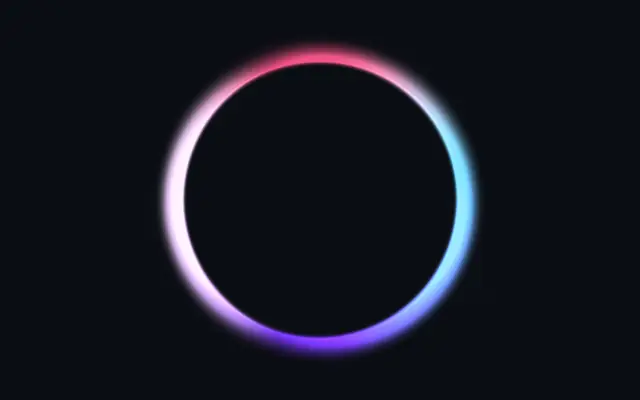
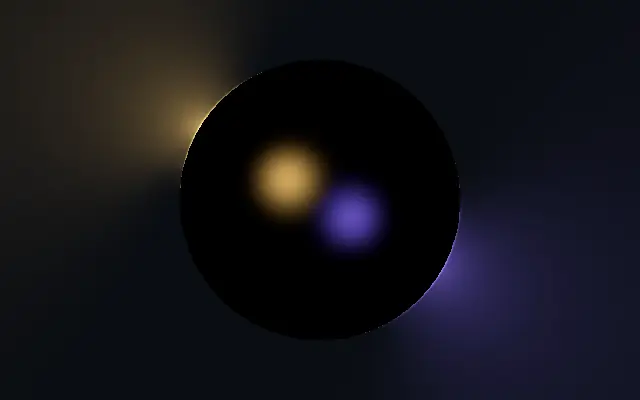
Colored point lights illuminate a shape's edges and spill light into the surrounding area.

Also known as: IrradianceEdge illuminationLight spill

Moves in browsers that support WebGPU

This device could not render the demo — showing a still

React
// Renders only in browsers with WebGPU.
import { Shader, Irradiance } from 'shaders/react'

export default function ShaderEffect() {
  return (
    <Shader style={{ width: '100%', height: 320 }} disableTelemetry>
      <Irradiance />
    </Shader>
  )
}
Vue
<!-- Renders only in browsers with WebGPU. -->
<script setup lang="ts">
import { Shader, Irradiance } from 'shaders/vue'
</script>

<template>
  <Shader style="width: 100%; height: 320px" :disable-telemetry="true">
    <Irradiance/>
  </Shader>
</template>
Svelte
<!-- Renders only in browsers with WebGPU. -->
<script>
  import { Shader, Irradiance } from 'shaders/svelte'
</script>

<Shader style="width: 100%; height: 320px" disableTelemetry>
  <Irradiance />
</Shader>
Solid
// Renders only in browsers with WebGPU.
import { Shader, Irradiance } from 'shaders/solid'

export default function ShaderEffect() {
  return (
    <Shader style={{ width: '100%', height: '320px' }} disableTelemetry>
      <Irradiance />
    </Shader>
  )
}
JavaScript
// Renders only in browsers with WebGPU.
// expects <canvas id="canvas" style="width:100%;height:320px"></canvas> on the page
import { createShader } from 'shaders/js'

const shader = await createShader(document.getElementById("canvas"), {
  components: [
    {
      type: 'Irradiance',
    }
  ]
}, { disableTelemetry: true })

Props · Irradiance

Changes apply to the demo above and to the code tabs. Descriptions come from the library registry (MIT).

NameValueDefaultRange / optionsDescription
originOriginSet in codecenter—Reference edge the center position is measured from (center default). Lets you pin the shape relative to a corner or the canvas centre.
centerCenter
x0.5y0.5
{"x":0.5,"y":0.5}x, y: 0 – 1Center position of the shape
scaleScale10.1 – 3 (step 0.01)Scale of the shape (1 = default size)
rotationRotation00 – 360 (step 1)Rotation of the shape in degrees
lightsLightsSet in code[{"position":{"x":0.3,"y":0.3},"color":"#ffb347","intensi…—The point lights striking the shape — each with its own position, color and brightness
lightHeightLight Height0.50.05 – 3 (step 0.01)Height of the lights above the shape plane, relative to the shape — low lights graze the body, high lights flood it evenly
lightRangeRange1.20.1 – 4 (step 0.01)Reach of each light — the distance at which it has fallen to half strength, relative to the shape
reachReach30.5 – 8 (step 0.01)How far from the shape the spilled light is gathered, relative to the shape — the glow fades out toward this distance
coreCore10 – 2 (step 0.01)The lit edge seen directly — the white-hot line along the rim where the lights strike
wrapWrap0.10 – 1 (step 0.01)How far light wraps around edges that face away from it — 0 leaves the far side dark
shadowsShadowstrue—Cast shadows — the body blocks each light from edges it stands in front of (keeps holes and concave pockets dark)
shadowSoftnessShadow Softness0.150 – 1 (step 0.01)Penumbra width of the cast shadows — 0 is razor sharp
bodyColorBody Color#000000—Color of the shape itself — black for a pure occluder, lighter to see the lights land on its form
bodyLightBody Light0.60 – 2 (step 0.01)How much the lights illuminate the body — the bevel of a flat shape or the form of a 3D one
bevelWidthBevel Width0.010.005 – 0.2 (step 0.001)Width of the rounded edge a flat shape catches the light on, relative to the shape
edgeSoftnessEdge Softness0.050 – 1 (step 0.01)Softness of the shape boundary edge
shapeShapeSet in code{"type":"sphere3D","radius":0.35}—Serialized shape configuration (JSON)
shapeSdfUrlshapeSdfUrlSet in code—URL to a pre-generated SDF .bin file
shapeTypeshapeTypeSet in code—Active SDF shape type

Every component also takes blendMode · opacity · visible · maskSource/maskType · boundingBox · id

It feels like colored spotlights hitting an object in a dark space: light spills from the edges, brightening where colors meet.

Adjust each light's position, color, and brightness in `lights`. `reach` changes how far the spill extends beyond the shape, and `core` sets the directly lit edge. Raise `wrap` to let light reach away-facing sides; `shadows` toggles shadows where the shape blocks a light.

The effect creates its own shape, and simple or dark scenes make the edge lights easier to see. Several overlapping spills can merge and obscure the main silhouette, so keep the outline clear.

When to use

Use it for glowing badge edges, rim lighting on a product illustration, or an accent object on a dark backdrop. Avoid it when overlapping lights would hide the shape or a clean solid outline is needed.

Open as page ↗