스크래치

Scratches

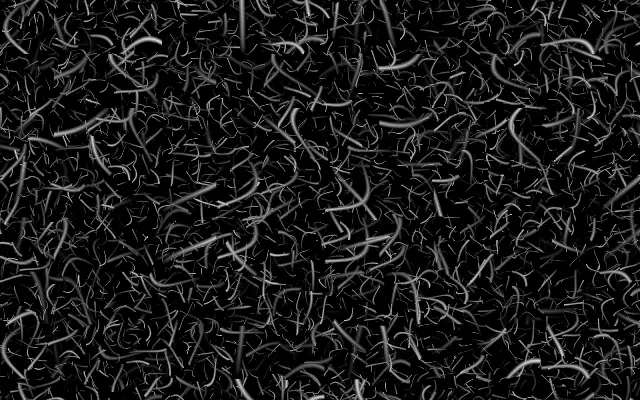
낡은 필름이나 긁힌 표면처럼 가는 흠집 무늬를 만듭니다.

다른 이름: Scratches필름 스크래치

WebGPU 를 지원하는 브라우저에서 움직입니다

이 기기에서는 데모를 그리지 못해 정지 화면을 보여 줍니다

React
// WebGPU 를 지원하는 브라우저에서만 그립니다.
import { Shader, Scratches } from 'shaders/react'

export default function ShaderEffect() {
  return (
    <Shader style={{ width: '100%', height: 320 }} disableTelemetry>
      <Scratches />
    </Shader>
  )
}
Vue
<!-- WebGPU 를 지원하는 브라우저에서만 그립니다. -->
<script setup lang="ts">
import { Shader, Scratches } from 'shaders/vue'
</script>

<template>
  <Shader style="width: 100%; height: 320px" :disable-telemetry="true">
    <Scratches/>
  </Shader>
</template>
Svelte
<!-- WebGPU 를 지원하는 브라우저에서만 그립니다. -->
<script>
  import { Shader, Scratches } from 'shaders/svelte'
</script>

<Shader style="width: 100%; height: 320px" disableTelemetry>
  <Scratches />
</Shader>
Solid
// WebGPU 를 지원하는 브라우저에서만 그립니다.
import { Shader, Scratches } from 'shaders/solid'

export default function ShaderEffect() {
  return (
    <Shader style={{ width: '100%', height: '320px' }} disableTelemetry>
      <Scratches />
    </Shader>
  )
}
JavaScript
// WebGPU 를 지원하는 브라우저에서만 그립니다.
// <canvas id="canvas" style="width:100%;height:320px"></canvas> 가 페이지에 있어야 한다
import { createShader } from 'shaders/js'

const shader = await createShader(document.getElementById("canvas"), {
  components: [
    {
      type: 'Scratches',
    }
  ]
}, { disableTelemetry: true })

속성(props) · Scratches

값을 바꾸면 위 데모와 코드 탭에 바로 반영됩니다. 설명은 라이브러리 레지스트리의 영어 원문(MIT)입니다.

이름값기본값범위·선택지설명(원문)
colorAColor A#ffffff—First color
colorBColor B#000000—Second color
scaleScale2-2 – 5 (step 0.1)Pattern scale (higher = more, finer scratches)
thicknessThickness10.2 – 5 (step 0.01)Thickness of the scratches (higher = bolder streaks)
seedSeed00 – 100 (step 1)Random seed for pattern variation
speedSpeed10 – 5 (step 0.1)Animation speed

모든 컴포넌트 공통: blendMode · opacity · visible · maskSource/maskType · boundingBox · id

오래된 필름이나 사용감이 있는 표면에 남은 가느다란 긁힘처럼 보입니다. 균일한 색 면에 거친 흔적을 얹어 오래된 매체의 느낌을 줍니다.

`scale`을 높이면 흠집이 더 많고 가늘어지며, `thickness`를 높이면 각각의 자국이 굵어집니다. `seed`를 바꾸면 패턴의 무작위 배치가 달라지고 `speed`는 움직임의 속도를 정합니다. 두 색을 사용해 밝고 어두운 자국을 함께 만듭니다.

이 패턴은 자체적으로 캔버스를 채우므로 입력 레이어가 필요 없습니다. 기본 `speed`는 1이라 움직입니다. 흠집을 지나치게 굵거나 대비 높게 두면 사진과 글의 세부를 덮을 수 있으니, 질감만 보태고 싶다면 강도를 절제하세요.

언제 쓰나

빈티지 필름 배경, 낡은 포스터 질감, 균일한 그래픽에 사용감이 필요할 때 좋습니다. 사진의 세부나 작은 글을 가리는 강한 흠집은 피하세요.

페이지로 열기 ↗