Lens Flare

렌즈 플레어

Realistic camera lens flare with artifacts.

Also known as: LensFlareLens flareOptical flare

Moves in browsers that support WebGPU

This device could not render the demo — showing a still

React
// Renders only in browsers with WebGPU.
import { Shader, LensFlare } from 'shaders/react'

export default function ShaderEffect() {
  return (
    <Shader style={{ width: '100%', height: 320 }} disableTelemetry>
      <LensFlare />
    </Shader>
  )
}
Vue
<!-- Renders only in browsers with WebGPU. -->
<script setup lang="ts">
import { Shader, LensFlare } from 'shaders/vue'
</script>

<template>
  <Shader style="width: 100%; height: 320px" :disable-telemetry="true">
    <LensFlare/>
  </Shader>
</template>
Svelte
<!-- Renders only in browsers with WebGPU. -->
<script>
  import { Shader, LensFlare } from 'shaders/svelte'
</script>

<Shader style="width: 100%; height: 320px" disableTelemetry>
  <LensFlare />
</Shader>
Solid
// Renders only in browsers with WebGPU.
import { Shader, LensFlare } from 'shaders/solid'

export default function ShaderEffect() {
  return (
    <Shader style={{ width: '100%', height: '320px' }} disableTelemetry>
      <LensFlare />
    </Shader>
  )
}
JavaScript
// Renders only in browsers with WebGPU.
// expects <canvas id="canvas" style="width:100%;height:320px"></canvas> on the page
import { createShader } from 'shaders/js'

const shader = await createShader(document.getElementById("canvas"), {
  components: [
    {
      type: 'LensFlare',
    }
  ]
}, { disableTelemetry: true })

Props · LensFlare

Changes apply to the demo above and to the code tabs. Descriptions come from the library registry (MIT).

NameValueDefaultRange / optionsDescription
lightPositionLight Position
x0.3y0.3
{"x":0.3,"y":0.3}x, y: 0 – 1Position of the light source
intensityIntensity0.50 – 2 (step 0.01)Master brightness of the entire lens flare effect
ghostIntensityGhosts0.40 – 1 (step 0.01)Brightness of internal reflection ghost discs along the flare axis
ghostSpreadGhost Spread0.70.1 – 2 (step 0.01)Spacing between ghost reflections along the flare axis
ghostChromaGhost Chroma0.30 – 1 (step 0.01)Rainbow chromatic fringing around ghost element edges
haloIntensityHalo0.40 – 1 (step 0.01)Brightness of the circular halo ring from internal reflection
haloRadiusHalo Size0.60.1 – 1 (step 0.01)Radius of the halo ring
haloChromaHalo Chroma0.60 – 1 (step 0.01)Spectral dispersion on the halo creating rainbow color separation
haloSoftnessHalo Softness0.80.01 – 3 (step 0.01)Thickness and softness of the halo ring
starburstIntensityStarburst0.30 – 1 (step 0.01)Brightness of diffraction spikes radiating from the light source
starburstPointsBlades64 – 16 (step 1)Number of starburst spikes (simulates aperture blade count)
streakIntensityStreak0.150 – 1 (step 0.01)Brightness of horizontal anamorphic light streak
streakLengthStreak Length0.50.1 – 1 (step 0.01)Horizontal extent of the anamorphic streak
glareIntensityGlare0.20 – 1 (step 0.01)Soft veiling glare that washes out contrast around the light
glareSizeGlare Size0.50.1 – 1 (step 0.01)Size of the soft glare glow
edgeFadeEdge Fade0.20 – 1 (step 0.01)How much the flare fades when the light source is near the screen edge (0 = no fade, 1 = heavy fade)
speedSpeed0.50 – 3 (step 0.1)Speed of subtle flare shimmer and starburst rotation

Every component also takes blendMode · opacity · visible · maskSource/maskType · boundingBox · id

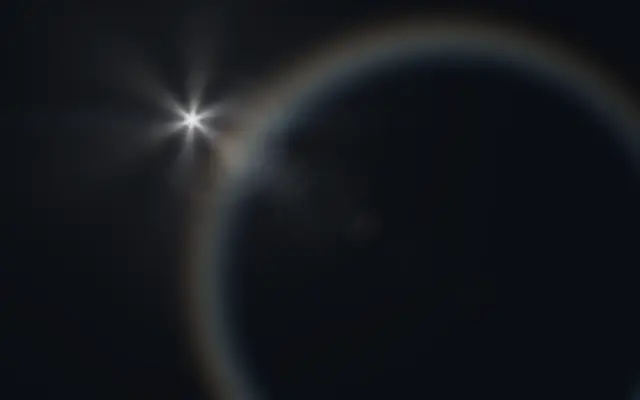
It recreates the reflection rings and light artifacts that appear when a camera points toward a bright source, with several details radiating around one light.

Move the virtual light with `lightPosition`. `intensity` from 0–2 sets overall brightness, `ghostIntensity` from 0–1 changes reflection discs along the flare axis, `haloRadius` from 0.1–1 sets the ring size, and `starburstIntensity` from 0–1 controls the star shaped rays.

Lens Flare draws its own effect and does not detect a light source in a photo. Align `lightPosition` with a bright point in the background, and keep the ghosts and halo away from text or small controls.

When to use

Use it for a cinematic title, a hero that needs a highlighted light source, or a decorative accent on a photo or video. Avoid it in scenes without a bright source or screens with many small details to read.

Open as page ↗